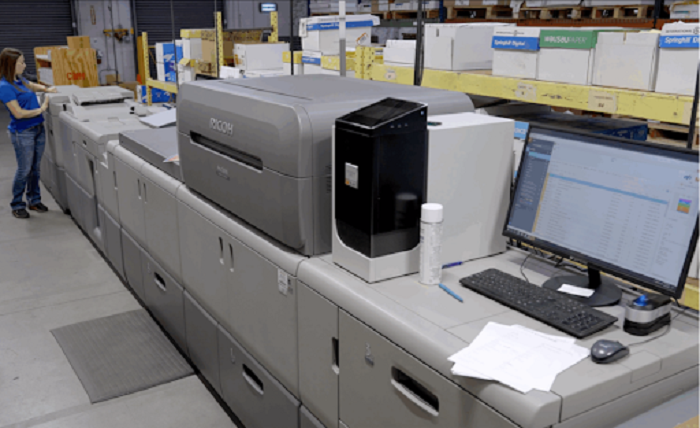
Managing print becomes more involved as your business grows. More employees, offices, and devices can mean higher print volumes, more supplies to track, and more equipment to maintain.
Without a clear system, print-related tasks can spread across teams and locations. A managed approach can bring devices, supplies, maintenance, monitoring, and support into one organized process.
A good print partner can take much of that work off your team’s plate. You can spend more time on core business tasks and less time handling printer service, supplies, and other routine needs.
That is where NextPage comes in. As a Kansas City-based managed print services company with nationwide reach, it takes a structured approach to managing your print environment. The process starts with understanding what you have now and uses that information to build a plan around your needs.
The sections below explain NextPage’s approach to managed print solutions for growing businesses, from reviewing your current print environment to managing devices, supplies, security, and workflows.
1. Bring Print Under One Agreement

NextPage’s managed print solutions can bring devices, supplies, repairs, monitoring, and cost control under one service agreement. Instead of working with several vendors, you have one plan for your print needs.
With NextPage, a single service structure can take several routine tasks off your staff’s plate. Your team can spend more time on customers, operations, and other core work, while IT can focus on broader technology needs.
Support also becomes easier to follow. When a device needs service or a supply issue comes up, you have one main provider to contact, NextPage, rather than figuring out which vendor handles each task.
With those responsibilities brought together, you have a better starting point for reviewing your current print environment.
2. Review Current Print Environment
Before changing equipment, you need to know how your current print environment works. NextPage starts with an assessment of your devices, print activity, and existing needs.
A review can uncover equipment that sees little use, devices that perform similar jobs, or different printer models that make supplies and maintenance harder to manage. It can also give you a better view of where print resources are being used.
That information gives you a stronger basis for making decisions. Instead of adding another printer whenever a new need appears, you can look at the full environment and decide what actually belongs there.
Once you know where your equipment stands, the next question is whether your fleet is sized correctly.
3. Right-Size Devices and Track Use
The next step is matching equipment to your actual printing needs. Right-sizing can reduce unnecessary devices, while consistent equipment can simplify supplies and maintenance.
Fleet size is only part of the picture. Output tracking by user, device, and department gives you a clearer view of print activity, including high-volume areas, underused equipment, and changing print habits.
A 2023 field study published in Information & Management found that email feedback about printing reduced paper use among 95 university staff. The finding suggests that useful print information can encourage more careful use.
NextPage includes output tracking in its managed print approach, giving you useful data for reviewing print costs and usage.
With usage information in hand, you can also consider controls that protect sensitive documents.
4. Protect Sensitive Files
Print data shows how equipment is used, but security controls determine who can access printed documents. Your team may handle patient records, financial details, contracts, employee information, and other private files.
Secure pull printing holds a job until you authenticate at the device. User authentication and encrypted data pathways add protection as print jobs move through your environment.
NextPage also supports HIPAA-ready processes for organizations that handle protected health information.
These security measures can also support safer everyday printing by controlling when and where sensitive documents are released.
5. Maintain Color Consistency
Marketing materials, forms, signs, and other branded documents need to look consistent when they are produced in different locations. Differences between devices can make that harder to achieve.
G7 color management is part of NextPage’s approach to maintaining consistent output across its print fleet. G7 provides a common method for managing print color and can help support more uniform results between devices.
A shared color standard gives marketing and operations teams a common target. Your materials can follow the same print expectations instead of looking noticeably different from one office to another.
That consistency becomes more useful when several locations produce materials for the same brand.
6. Manage Supplies and Maintenance
Consistent output depends on having the right supplies available. Toner and ink shortages can interrupt work, while missed maintenance can leave equipment unavailable when your team needs it.
Automated toner and ink replenishment helps keep supplies available as part of the managed print service. Staff do not have to rely on manual checks for every device or place separate orders whenever a cartridge runs low.
Proactive maintenance is also part of the service. Planned attention can help keep equipment ready and give you a more organized way to address device needs.
When an issue does arise, NextPage provides one helpdesk for your print environment. Your staff has a defined support channel rather than having to identify the right vendor for each machine.
Once the equipment and support side is organized, document handling itself becomes another area to consider.
7. Support Document Workflows
Printing is often only one step in a larger document process. A file may need to be scanned, routed to another department, printed, reviewed, or stored before a task is complete.
Workflow automation and digital document routing can reduce some of the manual handling involved in those steps. Digital routing can help move information to the right destination as part of an established process.
NextPage includes workflow automation in its managed print services, giving you options beyond basic device and supply management. A more connected document process can be useful when information regularly moves between teams or locations.
Managed print can therefore extend beyond keeping printers supplied and working. It can also support the document processes that sit around your print environment.
Bottom Line
Managing print becomes more involved when your business has more devices, employees, locations, and documents.
NextPage takes a structured approach that starts with reviewing your print environment and moves into fleet management, usage tracking, document security, color consistency, supply management, maintenance, and workflow support.
Bringing these areas together gives you a more organized way to manage everyday print needs. You can also monitor equipment, supplies, and print activity more easily. As your business changes, that visibility can help keep your print environment aligned with your day-to-day operations.