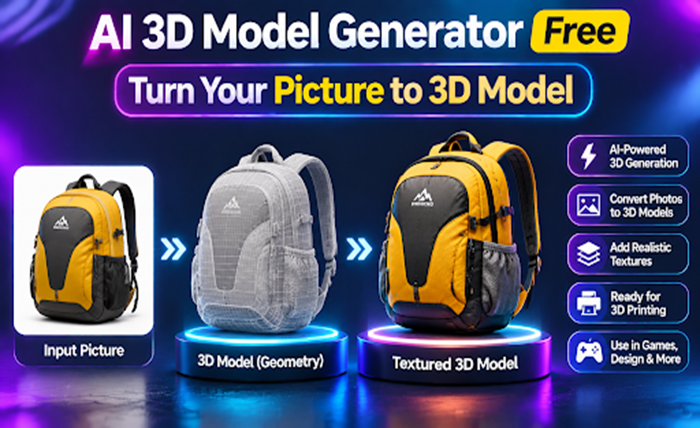
Creating 3D models has traditionally required specialized software, technical knowledge, and considerable time. From designing digital characters to developing product prototypes, traditional 3D modeling often involves manually building shapes, adjusting geometry, and adding realistic surface details. However, artificial intelligence is changing this process by making 3D creation faster and more accessible.
With an AI 3D model generator free, users can explore new ways to transform creative ideas, photographs, and illustrations into three-dimensional digital objects. Whether you are a beginner, digital artist, game developer, product designer, or 3D printing enthusiast, AI-powered tools can help simplify your creative workflow.
Instead of constructing every object manually, you can start with a reference image and let artificial intelligence assist with generating its three-dimensional structure. Platforms such as ai 3d model generator free allow creators to explore AI-powered 3D modeling and discover new possibilities for digital design.
One particularly useful feature is the ability to convert an ordinary photograph into a three-dimensional object. This makes picture-based 3D generation an exciting option for people who want to turn visual concepts into digital assets.
What Is an AI 3D Model Generator?
An AI 3D model generator is a digital tool that uses artificial intelligence to create three-dimensional objects from supported inputs, such as images, text descriptions, or visual references.
Traditional modeling software requires users to understand concepts such as vertices, polygons, meshes, and surface geometry. Creating a detailed object can involve considerable manual work.
AI-powered generators simplify parts of this process by analyzing visual information and automatically producing a three-dimensional representation.
For example, you can provide a photograph of a shoe, chair, character, animal, or decorative object. The AI analyzes the reference and attempts to reconstruct its shape and appearance in three dimensions.
These tools can support several creative applications:
- Creating digital characters and collectible figures.
- Converting product photographs into 3D assets.
- Designing objects for video games.
- Developing product visualization concepts.
- Creating decorative models and sculptures.
- Preparing digital assets for 3D printing.
- Producing objects for animation and digital artwork.
The quality and usability of generated models depend on the input, AI technology, and intended application. Some models may require additional refinement before professional use.
How Does Picture to 3D Model AI Technology Work?
Picture-to-3D technology uses artificial intelligence to interpret a two-dimensional image and generate a corresponding three-dimensional structure.
Although the exact process varies between platforms, the general workflow involves several stages.
1. Upload Your Picture
The first step is selecting an image of the object you want to convert.
You can use photographs of products, animals, furniture, toys, accessories, or character illustrations.
For better results, choose an image with:
- Clear object visibility.
- Good lighting and contrast.
- Minimal background distractions.
- Visible edges and important details.
- Limited obstruction of the main subject.
A high-quality reference image can help the AI understand the object’s appearance more effectively.
2. AI Analyzes the Image
After uploading the picture, the AI system analyzes its visual characteristics.
It identifies information such as the object’s shape, proportions, contours, and visible surface details.
Since a single photograph does not show every side of an object, the AI may need to estimate hidden areas when generating the three-dimensional representation.
3. Generate the 3D Model
The AI processes the analyzed information and creates a three-dimensional structure.
This structure contains geometric information that defines the object’s shape and depth.
Depending on the platform, users may be able to preview the generated model, make adjustments, and prepare it for export.
4. Refine and Export
After generation, inspect the model carefully.
Check whether the proportions, surfaces, and important details match your original reference. If necessary, use compatible 3D software to improve the geometry.
Depending on the tool, available export formats may include GLB, OBJ, FBX, STL, or USDZ.
Why Use an AI 3D Model Generator Free?
AI-powered 3D creation offers several advantages for beginners and experienced designers.
Faster Model Creation
Traditional 3D modeling can take hours, especially when creating detailed objects from scratch.
AI automation can reduce the initial modeling effort, allowing creators to focus on refining their designs and exploring new ideas.
Beginner-Friendly Experience
Learning professional 3D modeling software can be challenging. Beginners often need to understand complex interfaces, modeling tools, and technical workflows.
An AI-powered generator offers a more accessible starting point because users can work with familiar visual references.
Lower Initial Investment
Free access options can help beginners experiment with 3D creation without immediately purchasing expensive software or subscriptions.
However, free plans may have limitations involving generation credits, export options, processing speed, or available features. Always check the platform’s current pricing and usage conditions.
More Creative Opportunities
AI tools make it easier to experiment with different objects and visual concepts.
You can explore character designs, product ideas, decorative figures, and digital collectibles without manually constructing every component.
How to Convert a Picture to a 3D Model Online
If you want to transform a photograph into a three-dimensional object, an image-to-3D platform can simplify the process.
Here is a practical workflow:
Step 1: Choose Your Reference Picture
Select a clear image of the object you want to recreate. Make sure the subject is visible and not excessively cropped.
Step 2: Open an Image-to-3D Tool
Visit a compatible AI-powered platform and locate its image-to-3D generation feature.
Step 3: Upload the Image
Provide your selected photograph and follow the platform’s instructions.
Step 4: Generate the Model
Start the generation process and allow the AI to analyze the reference and create the three-dimensional object.
Step 5: Preview the Result
Rotate and inspect the generated model. Look for missing details, unusual geometry, or inaccurate proportions.
Step 6: Export the Model
If the result meets your requirements, export it in a supported format for additional editing, visualization, or 3D printing.
Explore Hi3D for Picture-to-3D Model Generation
If you want to experiment with AI-powered 3D creation, Hi3D is a platform worth exploring.
It provides AI-assisted tools designed to help users create and work with three-dimensional digital assets. Its image-to-3D capabilities are particularly relevant for creators who want to transform existing photographs and illustrations into 3D models.
You can explore the picture to 3d model tool to learn more about converting visual references into three-dimensional objects.
This workflow can be useful for people working on:
- Product visualization and digital presentations.
- Character and collectible figure creation.
- Game development assets.
- Creative digital sculptures.
- 3D printing concepts.
- Personal design and experimentation.
Hi3D also offers additional 3D creation capabilities, including AI texturing and other model-related workflows. These features can help users explore different stages of digital asset development.
Where Can You Use AI-Generated 3D Models?
The applications of AI-generated models extend across several industries.
1. 3D Printing
One of the most interesting applications is turning digital designs into physical objects.
Users can create figurines, decorative items, personalized gifts, and collectible models.
Before printing, however, the generated geometry may require mesh repair, wall-thickness adjustments, and other preparation to ensure that the model is printable.
2. Game Development
Game developers can use AI-generated assets as starting points for characters, props, environmental objects, and creative concepts.
Additional optimization, retopology, and rigging may be necessary before using models in production-ready games.
3. Product Design
Product designers can transform reference photographs into three-dimensional concepts for visualization and further development.
This can help communicate ideas before moving into detailed CAD modeling or manufacturing workflows.
4. E-Commerce
Online businesses can explore 3D product visualization to present their products from different angles.
Digital 3D assets can also support interactive product experiences and creative marketing materials.
5. Animation and Digital Art
Artists can use generated models as starting points for characters, props, and visual storytelling projects.
Additional sculpting, texturing, and rigging can help prepare these assets for more advanced creative applications.
Tips for Getting Better AI 3D Generation Results
To improve your results when using an AI 3D model generator, follow these practical recommendations:
- Use high-resolution pictures: Clear images provide better visual information.
- Avoid complicated backgrounds: Unnecessary objects may interfere with image interpretation.
- Show the complete object: Cropped subjects can make reconstruction more difficult.
- Choose appropriate angles: Multiple reference views can provide additional information when supported.
- Review the geometry: Inspect the generated model for missing surfaces and unusual shapes.
- Select suitable export formats: Choose a format compatible with your intended application.
- Refine when necessary: Use additional 3D software to correct structural or visual problems.
Conclusion
AI is transforming digital design by making three-dimensional creation more accessible and convenient. An AI 3D model generator free provides an opportunity for beginners and experienced creators to experiment with image-based modeling without building every object manually.
With picture to 3D model technology, ordinary photographs and illustrations can become starting points for digital characters, product concepts, game assets, and printable objects.
Platforms such as Hi3D make it easier to explore AI-powered 3D creation and discover new ways to transform visual ideas into three-dimensional designs.
Whether you are interested in digital art, product visualization, game development, or 3D printing, AI-powered modeling tools can help you explore your creativity and bring more ideas to life.